• Home
  • Blog
  • Support

VDMX - MAC VJ SOFTWARE

  • Home
  • Blog
  • Support
  • Menu

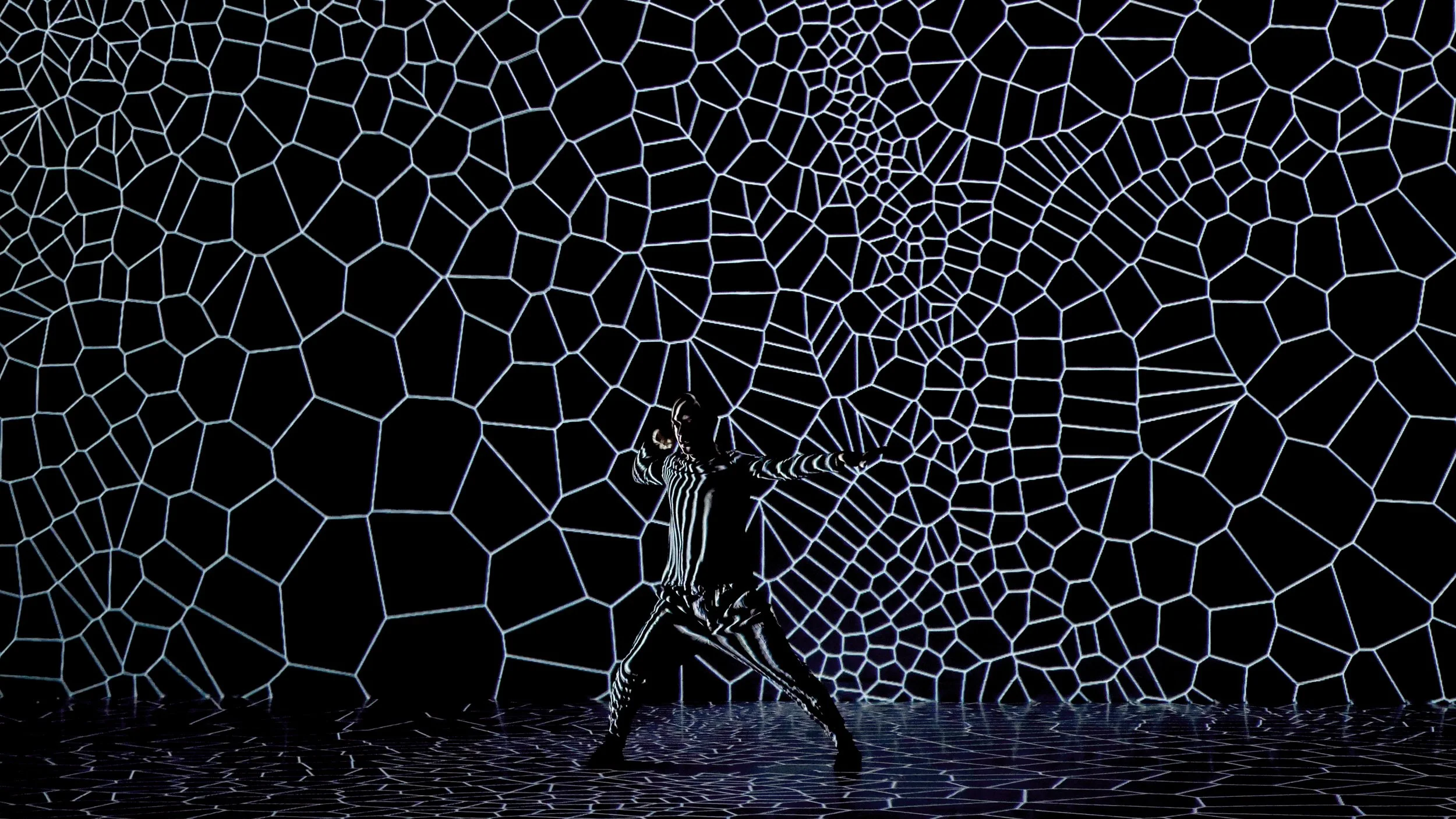
‘assimilating' - Photo by S20

Mapping Festival 2024 interview with Hiroaki Umeda

June 6, 2024

One of the performers at Mapping Festival 2024 was the choreographer / dancer Hiroaki Umeda who performed their dance piece Median. Sadly our team didn’t arrive in Geneva until the following week, but fortunately we were able to connect with them over email for a quick interview!


1. Who are you and what do you do?

I am a choreographer, dancer, visual artist from Japan, based in Tokyo. Most of my dance pieces, I do choreography, composing the sound, visual design. As extension of my dance pieces, I also make visual installations.

2. What tools (hardware, software, and other) do you use in your work?

For sound creation, recently I have changed to Ableton Live. For visual creation, programmers in the production team use different tools such as Touchdesigner, openFrameworks, houdini etc. For the operation of dance performance, Logic X, Max, VDMX and Touchdesigner.

3. Tell us about your latest performance at Mapping Festival!

The title of the piece was ‘Median’ that is solo dance piece with video projections. I myself dance in the piece. The concept of the piece was choreographing micro scale visual materials and human body. As a choreographer, I have ambition to choreograph cells or some micro scale objects. From that, I made this dance performance. The programmers used a lot Voronoi program with Houdini and oF.

‘Median’ - Photos by S20

View fullsize ‘Median’ - Photo by S20

4. Can you tell us about your process for designing videos to use as part of dance? Does one come before the other?

First setting basic concept of show, key visual and key choreography. It is like parallel processing. For me designing visual materials including lighting, costume and etc is a part of choreography.

5. You have been working in this area for more than 10 years, what things have changed and what things are still the same about your workflow?

At the beginning of my career 20 years ago, I did all elements of the creation, sound, visual and choreography. with the time, the programming had gotten more and more complicated and specialized. So I needed to work with programers for visual elements and engineers for other technical parts like sensors. That was about 10 years ago. But recently, I see the softwares and programming have been developed a lot and designed more for wide range users. I can easily use sophisticated and complicated program by myself. For the latest my dance piece, I did all the creation like my beginning of my career by myself with Touchdesigner, Ableton Live and Azure kinect thanks to all the developers!


Want to see more work from Hiroaki Umeda? You can find them on YouTube and on http://hiroakiumeda.com

In Artist Feature Tags Dance, Choreographer

Download VDMX6

Download VDMX6 Plus

Download VDMX5


ISF for Motion


Buy VDMX

Email / Support

Free Sample Clips

Free Utility Apps

Open Source

GLSL Shaders

Privacy Policy

FAQ


Recent Features

Featured
Announcing VDMX 6.3!
Read more →
Community, Access, and Bending the Raster: A Conversation with Nica Ross and Seej

In the second episode of the VIDVOX podcast, hosts David Lublin and Cornelius sit down with two pillars of the live visual community: Nica Ross and Chris Jordan (Seej).

Read more →
Arts, Tech, and Glitch: A Conversation with Vade and Sarah GHP

The first in a new series of conversations from VIDVOX, hosts David Lublin and Cornelius (ProjectileObjects) sit down with artists Anton Marini (Vade) and SarahGHP to talk about breaking machines, analog history, and the art of making your own tools.

Read more →
Doing visuals for your first house party? Here's how to make it happen.
Read more →
ima_b688ecf_720.jpg
VDMX and macOS 26!
Read more →
Recommended VDMX Gear Guide 2025

Building the Ultimate VDMX Rig: The 2025 Gear Guide

Ready to build or upgrade your live visual setup? Our comprehensive new gear guide has you covered. We dive deep into the most important choice for any VJ: the right Apple Silicon Mac. Discover why even a budget-friendly Mac Mini can be a powerhouse for standalone installations, and which MacBook Pro models are best for the most demanding shows.

But the computer is just the start. We also cover crucial pro-tips on which macOS version to run for maximum stability, our top picks for essential peripherals like external SSDs, capture cards, and Thunderbolt docks, and a complete checklist for your VJ travel kit. Whether you're a seasoned pro or just starting out, this guide has the recommendations you need to build a rock-solid VDMX system. [Click to read the full guide...]

Read more →
Color Spaces, Compression Quality Metrics, and the Human Eye
Read more →
VDMX 6.2 Update: Pop over previews, directly capture audio from other apps, and more!

The VDMX 6.2 update is here! Directly capture audio from other applications, bundled ProjectMilkSyphon, improved fullscreen output panel, pop out previews, and more!

Read more →
Featured
Receiving and Displaying MIDI Time Code (MTC) with ISF
Read more →
VDMX_OREI_4Way.png
Four Outputs From One Mac: Using VDMX Advanced Output With an Affordable Video Wall Processor
Read more →
VDMX Eurorack Clock Sync Tutorial with the Pamela's Pro Workout

When working with Eurorack systems alongside VDMX, a particularly useful technique is to synchronize the clock timing between the systems using MIDI. In this tutorial we will be looking at two different ways to go about this. In the first section we will use the MIDI Clock output feature of VDMX to drive a Eurorack clock module. In the second section we will flip this and use MIDI clock out from our Eurorack clock module to control the tempo of a Clock plugin in VDMX.

Read more →
Spooky Halloween Projections with VDMX
Read more →
VuoSources.gif
Extending VDMX6 Plus with Vuo
Read more →
VDMX and Ableton Live: A Beginner's Guide to Animate your Music.

Learn how to create a powerful audio-visual synthesizer by linking VDMX and Ableton Live. This tutorial shows you how to use MIDI to control your music and then drive stunning, reactive visuals from your audio. Perfect for performers and creators looking to add a dynamic visual layer to their projects.

Read more →
Creating glitchy hologram style visuals with the Remove Background FX in VDMX6
Read more →
Some techniques for drawing text in GLSL
Read more →
Visualizing and adjusting color levels with the VDMX Scopes plugin
Read more →

Top Posts

Automatic BPM Detection

The “Hap” Open Source Video Codecs for OS X

Multi-screen video mixing on a Macbook Pro

Creating a multi-channel live camera video sampler

Video Fundamentals Taught with VDMX Part 1


Tutorials by Topic

Quick Start

Basics

Intermediate

Technique

Templates

Data-Sources

MIDI / OSC / DMX

Quartz Composer

ISF